Payroll System
Summary
Payroll is the time-review and sync workflow for turning field time evidence into reviewable, repairable, and sync-ready payroll state. Operators inspect weekly grids, day details, planned entries, pay-type overrides, blockers, sync failures, and run history before committing changes outward.
This thread starts from the payroll review UI and works backward into services, API routes, lakehouse payroll models, source refresh, sync dispatch, tests, and the operator runbook.
Module At A Glance
- Primary surface: payroll time-review UI with weekly grid, day detail, blockers, overrides, sync status, and audit history.
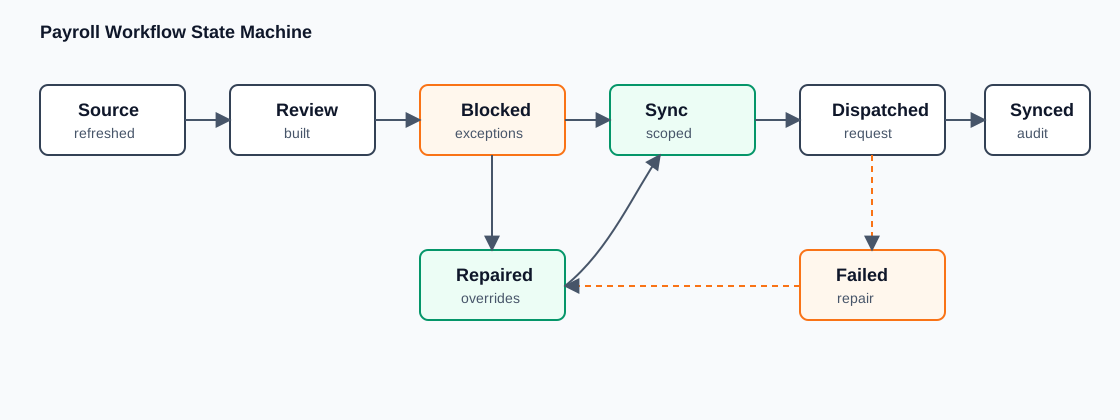
- Main state machine: Payroll Workflow State Machine.
- Key methodology: Payroll Exception Methodology.
- Sync depth: Payroll Sync And Exceptions Workflow.
Reader Question
How does LKCI review time, repair payroll blockers, and dispatch sync work without turning payroll into a one-shot batch job?
Surface Or Workflow
The entry surface is app/web/app/payroll/time-review, with adjacent exception and sync-run views. The API surface is app/api/payroll/time_review. Operators see a week-oriented review workflow with day detail panels, sync status, failure display, pay-type override controls, and audit trail.
Architecture Rationale
Payroll needs interactive state because sync safety depends on human review. Exceptions, overrides, and blockers are not incidental warnings; they are the workflow state that decides what can be dispatched outward.
Lifecycle
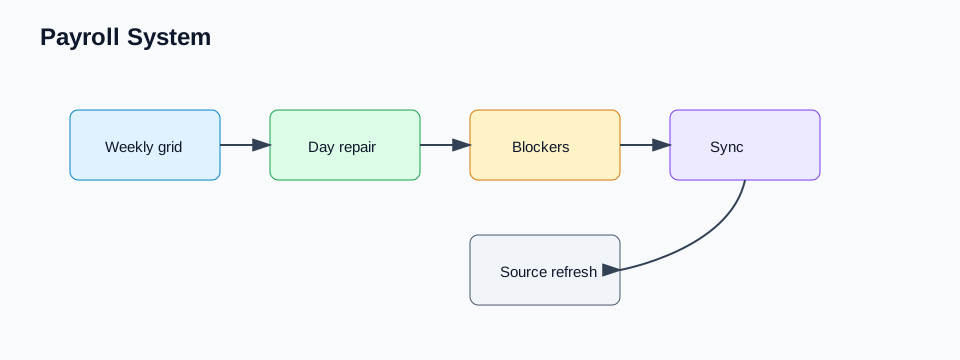
The workflow refreshes source evidence, builds payroll review state, presents exceptions and blockers, records repairs or overrides, dry-runs or scopes sync requests, dispatches sync work, and exposes failures for follow-up. Source data comes through lakehouse and ServiceTitan payroll seams, while the interactive review state stays in the payroll service/API/UI boundary.
Child Threads
- Payroll Time Review Workflow: weekly grid, day detail, repairs, overrides, blockers, and review state.
- Payroll Workflow State Machine: the system-level lifecycle from source refresh through review, blockers, repair, sync scope, dispatch, failure, and run history.
- Payroll Sync And Exceptions Workflow: sync scope, dispatch, failures, exception views, and run history.
- Payroll Exception Methodology: how time rows, edits, pay types, blockers, source refresh, and sync dispatch become reviewable payroll state.
- Review Workflow Foundations: shared repair, audit, and resumption concepts.
Implementation Boundaries
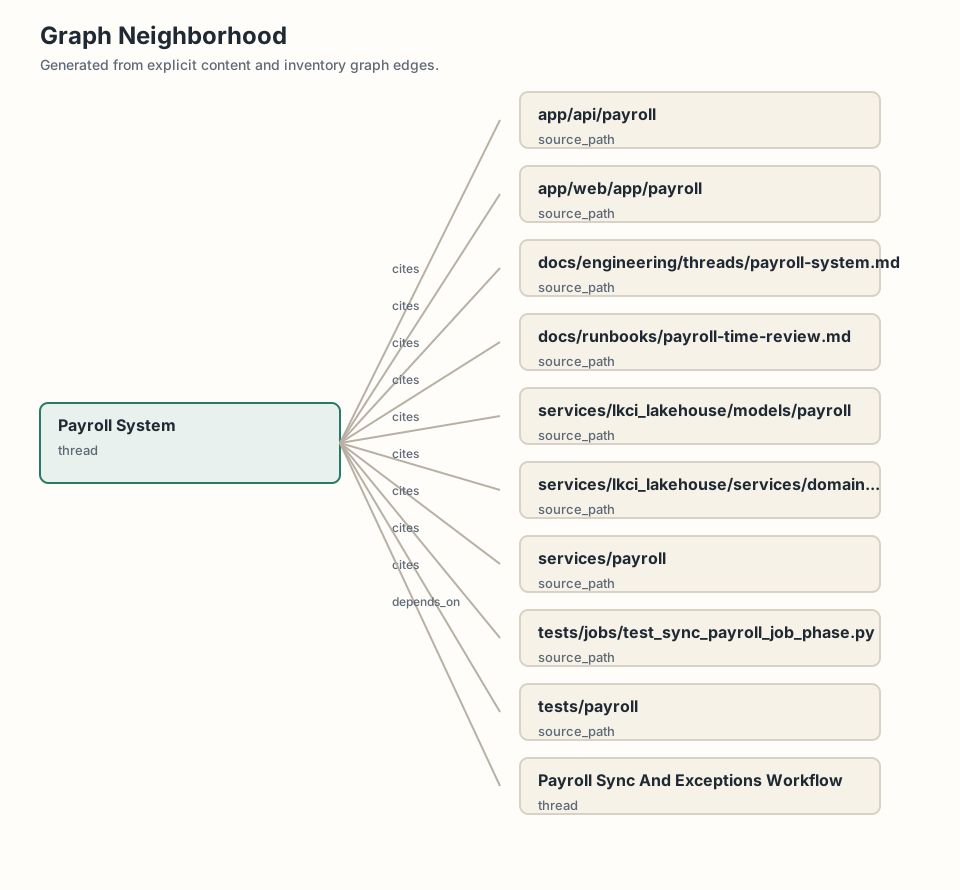
UI lives under app/web/app/payroll; API adapters live under app/api/payroll/time_review; service logic lives under services/payroll/time_review; payroll models live under services/lkci_lakehouse/models/payroll; source-domain reads include services/lkci_lakehouse/services/domains/servicetitan/payroll.py; tests live under tests/payroll and payroll job tests under tests/jobs.
Tradeoffs
Payroll state is interactive because sync safety depends on human review. The system carries more state than a transform-only pipeline, but that state lets operators see why a day is blocked, what was repaired, and what a sync request will affect.
Visual
The current visual is a graph neighborhood. The intended visual is a payroll review lifecycle from source refresh to weekly grid, blocker, repair, sync request, dispatch, failure, and run history.
Operator Narrative
Payroll review starts from the week because that is how the operator thinks about the work. A field employee's time, planned entries, pay type, day-level exceptions, source refresh status, and sync eligibility all need to be visible in one review flow. The operator is not trying to run a payroll transform. They are trying to decide whether time is correct enough to sync and what must be repaired before that happens.
The grid is therefore an operational review surface. It should surface exceptions, blockers, overrides, sync status, and audit history without making the operator understand lakehouse models or provider details. Day detail panels let the operator inspect the evidence behind a row. Repair controls record the decision. Sync views show what will be dispatched and what happened after dispatch.
This is why payroll cannot be a one-shot scheduled job. A job can refresh source data and propose sync work, but human review decides when exceptions are acceptable, when pay-type overrides are needed, and when a scoped sync request is safe. The workflow state is the point.
Source, Review, And Sync State
Payroll depends on source evidence from provider and lakehouse seams. That evidence should remain distinct from interactive review state. Source refresh answers what the platform currently knows. Review state records what an operator has inspected, repaired, overridden, or approved. Sync state records what the platform attempted to send or update externally.
Keeping those layers separate lets the platform explain changes. If a source refresh changes a row, that is a data event. If an operator overrides a pay type, that is a review action. If a sync request fails, that is a dispatch outcome. Collapsing those events into one table would make support difficult because the system could no longer answer whether a problem came from source data, human repair, or external sync.
The payroll services should therefore expose capabilities rather than raw tables. They can build review grids, compute blockers, apply overrides, create sync scopes, dispatch sync work, and expose run history. API routes adapt UI requests into those services. Jobs perform source refresh or sync dispatch. The UI presents state and captures intent.
Blockers And Repair
Blockers are not warnings sprinkled on a dashboard. They are payroll workflow state. A blocker says that a row, day, employee, or sync scope cannot safely advance without attention. Some blockers may be repairable by the operator. Others may require source refresh, provider investigation, or code changes. The system should make that distinction visible.
Repair actions should be specific. An operator may need to correct pay type, confirm a day, exclude an entry, adjust a planned row, or retry a sync. Each action should record actor context and should change only the state it owns. The platform should then recompute eligibility and sync scope through services rather than asking support to patch data manually.
This repair model also helps explain exceptions. An exception is not a failure unless the workflow has no safe path forward. Some exceptions become accepted state after review. Some become blockers. Some become provider diagnostics. Payroll documentation should teach that distinction because it is the heart of the module.
Sync Boundary
External sync is a provider-bound side effect and should be treated with the same discipline as POA commands or notification delivery. A sync request needs a scope, idempotency posture, source context, review context, dispatch result, and failure path. It should be possible to tell what was intended, what was sent, what the provider returned, and what can be retried.
Dry-run or planning behavior is useful because it lets the operator see the shape of a sync before committing. Run history is useful because it lets support distinguish "not reviewed," "reviewed but not dispatched," "dispatched and failed," and "dispatched successfully." These states matter to payroll operations and should not be hidden inside logs.
Payroll is therefore a compact example of the platform's broader pattern: source data enters, services build review state, humans repair ambiguity, jobs dispatch side effects, and diagnostics preserve the outcome.
Relationship To Other Systems
Payroll shares patterns with several larger modules. Like POA, it separates source evidence from operator repair and external sync. Like marketing, it needs run history and explainable state before side effects occur. Like data publication, it depends on source freshness and serving projections. Like operations, it needs diagnostics that tell support whether the problem is data, review, dispatch, or provider outcome.
The domain is smaller than precon or marketing, which makes it a useful orientation point. A reader can see the full platform posture in a compact workflow: source refresh, review grid, blocker, repair, sync request, dispatch, failure, and history. That shape is reusable even when the business objects change.
Why Payroll Is A Useful Reference System
Payroll is a good reference system because the business rules are concrete. An operator can understand the stakes without knowing every provider detail: time needs to be reviewed, exceptions need to be repaired, and sync needs to be traceable. That clarity makes the architecture easier to evaluate. If the system cannot explain a blocker or prove what was synchronized, the design is not good enough.
It also shows why small workflows still deserve platform discipline. A one-off sync script might work for a single clean run, but it would not give operators durable state, support repeatable review, or preserve enough evidence for later diagnosis. The platform version turns payroll into a repeatable operational loop rather than a fragile automation.
Source Evidence
app/web/app/payrollapp/api/payrollservices/payrollservices/lkci_lakehouse/models/payrollservices/lkci_lakehouse/services/domains/servicetitan/payroll.pydocs/runbooks/payroll-time-review.mdtests/payrolltests/jobs/test_sync_payroll_job_phase.py